
Phishing Is on the Rise: Here's How to Protect Your Business from Cyber Attacks
At ResNexus, our clients' security is our top priority. We maintain PCI- and GDPR-compliance to a high standard, and employ a third party to audit our system and operations on an annual basis to ensure the safety of our customers' data.
Despite all of our precautions, there are some security threats that are outside our control.
In today's interconnected world, we are witnessing a concerning rise in phishing attempts that threaten the safety of web users everywhere. Phishing is a devious tactic used by cyber criminals to trick individuals into divulging sensitive information such as passwords, financial data, or personal details. The ultimate objective of phishing is to steal money and information.
How to Make Sure You’re on the Real ResNexus Login Page
Sometimes phishers create fake pages that look like the ResNexus login screen to trick you into entering your username and password. Before you enter your information, here are three simple things to look for:
- Check the website address (URL).
The real login page always starts with https://resnexus.com (verifying that it's spelled correctly). Make sure you see https:// at the beginning when you click on the address bar. If the address looks even a little different, don’t sign in. - Check the security icon.
Most browsers show a padlock or a security icon next to the address. In some browsers (like Chrome), you may need to click the small info icon on the left to see the security details. It should show that the connection is secure and tied to resnexus.com. If your browser shows any warnings, close the page. - The real page should look like this.
We occasionally add or modify login notices and announcements, but the rest of the page should look familiar:
What do phishing emails look like?
Phishers attempt to masquerade their messages as legitimate communication from a trusted source. For example, an email might come through that appears to be from your bank. The branding and format are similar to prior messages from your bank, but closer examination may reveal some red flags.
We recommend you do the following before clicking on any links found in potentially phishing emails.
1. Double check the domain name of the email address.
The first dead giveaway is the domain name of the email address. The "name" of the sender might look correct, but the actual email address it was sent from looks a little off. Compare it against the sending address of an email that you know is actually from the source.
For example, communications from ResNexus have the email domain "@resnexus.com" without the quotes. Here are a list of addresses that you can be sure would come from ResNexus:
support@resnexus.com
communications@resnexus.com
franklin@resnexus.com
To contrast, here are some addresses that would not come from ResNexus, and should be reported to your support representative.
rn.companybulletin.u@resinexus.org
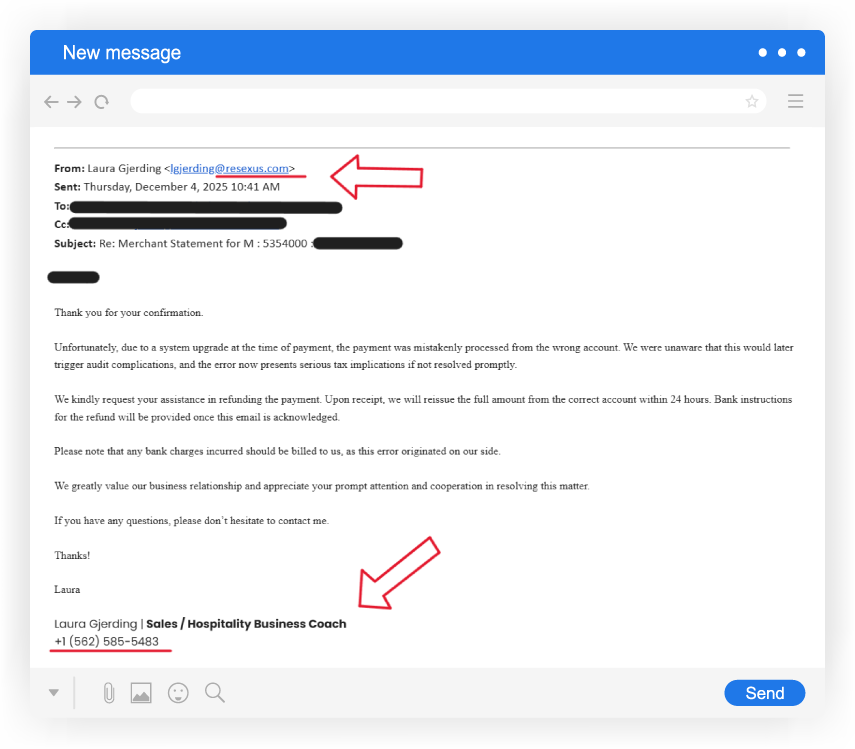
lgjerding@resexus.com
urgentmessage@resnaxus.com
support@reservationnexus.com
If a phone number is included in the email signature of someone claiming to be your ResNexus support representative, you can compare that phone number with the one found on your support page to see if they match.
2. Be more cautious with urgency request emails.
Another red flag is use of urgency and/or threats in the content of the email. ResNexus—and really, any legitimate business—will never ask for your login credentials. Phrases such as "ACTION NEEDED" and "URGENT ACCOUNT ERROR" are hallmarks of phishing attempts.
If you receive these types of emails from your bank, phone provider, or other service, we recommend calling them from sources that you control. For example, in the example of a credit card, call the customer support number on the back of the card rather than the number provided in the suspicious email or text.
3. Do not download file attachments until you have vetted the email.
Finally, never download unexpected file attachments from an email without confirming the legitimacy of the sender. Spreading malware and viruses is a common objective of phishing. Again, when in doubt about the legitimacy of an email, call your service provider with the number listed on their official website, bill statement, or back of card.
See below: example of a phishing email impersonating a ResNexus support representative. Note the incorrect email domain and phone number:

Phishing isn't just emails and websites.
Email communications are one of the primary mediums for phishing, but it's not the only one. Phishers might make use of phone calls, texts, third-party messaging apps, social media, and more. If you receive a communication from what you believe to be a trusted source, but through a channel that isn't typical for your past correspondence, that's a warning sign.
For example, ResNexus users usually communicate with their support representatives via phone and email. If a message with a strange request appears to come from ResNexus or someone who works at ResNexus through another platform such as LinkedIn or an SMS message, it's almost certainly a phisher.

Not sure if something is phishy?
If you're ever unsure about the validity of a communication, there's no harm in checking in with ResNexus support directly. Don't respond to the message in question; reach out to ResNexus using a trusted channel and confirm whether the message is legitimate or not. We'll be able to help you out in either case, and you'll be helping keep us informed on ongoing phishing attempts.
We recommend you take the same precautions with all of your service providers, including your bank, credit card, etc. By promptly reporting suspicious activity to the relevant channels, you can help keep your community more knowledgeable and secure.
Recent Posts